Software Update 2026.1.0 (21.01.2026)
Estima
- Change: Paste resources button has been changed to go grey when pasting is in progress. This gives feedback of the process to the user and stops user from pasting more than once accidentally.
- Fix: Fixed a bug in the Components window where all components would be hidden when “unit” cropping was on.
Software Update 2025.15.0 (14.01.2026)
Admicom Estima
Features
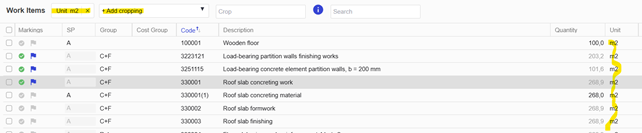
- Added “Unit” to cropping feature in Work Items and Building Components page. This can be used to find for example, rebars and concrete work items quickly.
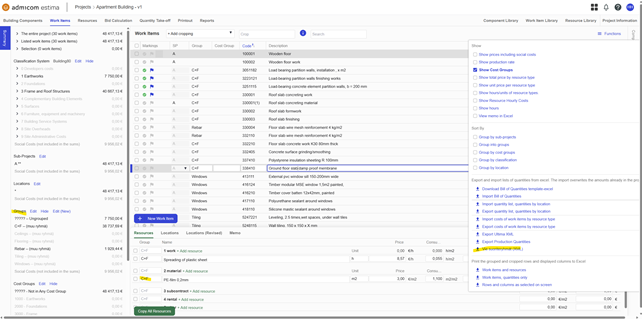
- Mainly concerns Finnish customers: Added an XML to Work Items page that allows user to export cost groups based on groups. This enables cost grouping on the resource level unlike cost grouping with cost groups that only works on work item level. XML export can then be uploaded to for example JydacomTH+ software.
Fixes
- Fixed E202 printout where social expenses were calculated to resource types where social expenses were not set.
- Optimised libraries and reference projects to work faster.
Admicom Insite
Fixes
- Added more characters to expenses descriptions.
Software Update 2025.14.0 (10.12.2025)
Features
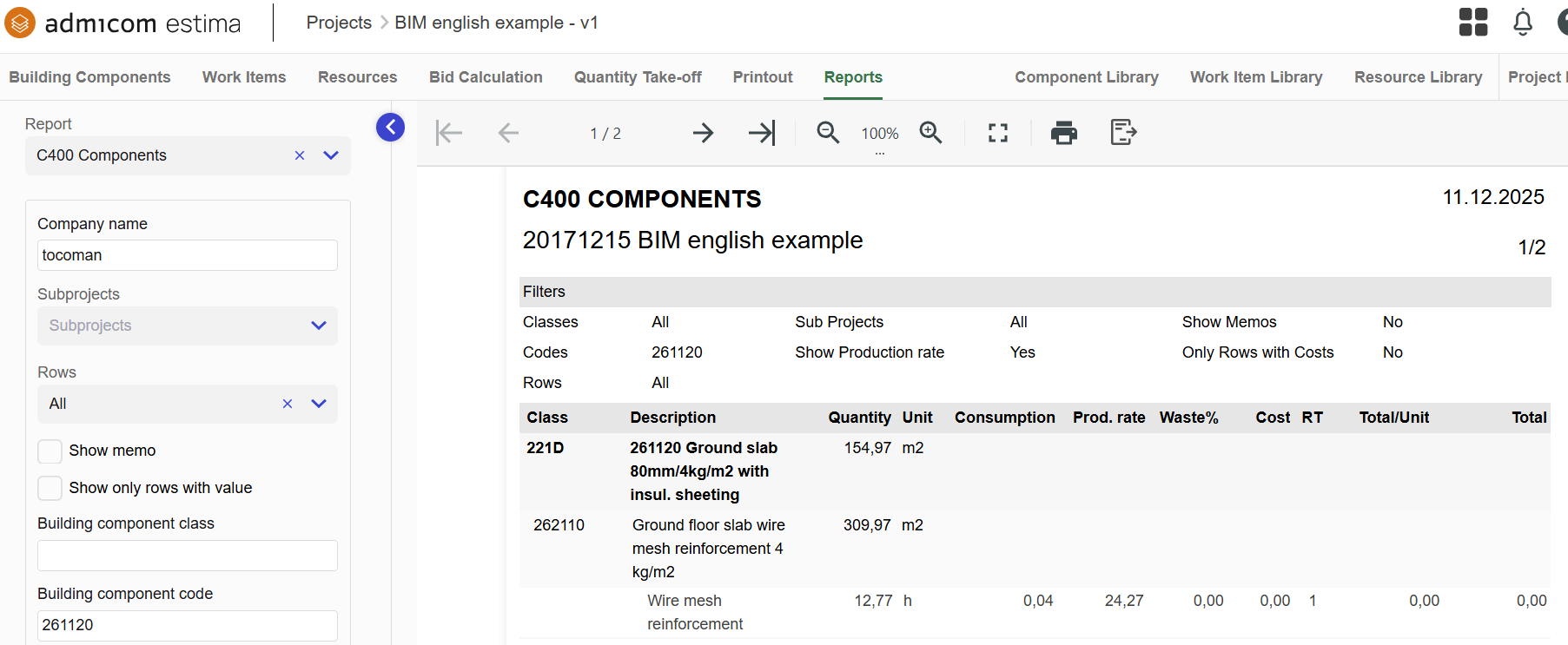
- New C400 Components report released.
Fixes
- Changed brand names (reporting->Insite) in a couple of locations in the solution.
- Fixed a bug where memo of work item did not update when changing rows.
- Fixed a bug in “Resources by location rows”-export where resource quantity and cost were wrong when connected to multiple components.
Software Update 2025.13.0 (25.11.2025)
Features
- Added Component Code and Component Description to Resources by location rows -excel export in Resources window.
Fixes
- Fixed a bug where changes to cost groups in the Summary tab would affect other projects.
- Fixed a bug where upon choosing a reference project the used would get an error message on the resource level in the reference project. This would require the user to refresh the browser to get rid of the message.
- Fixed a consumption rate bug in C200 Cost Estimate report.
Software Update 2025.12.0 (11.11.2025)
Features
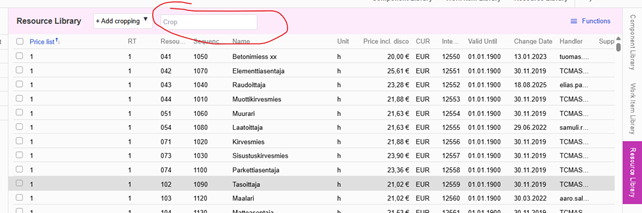
- Added a ”Crop” search bar to Resource Library in the far right panel of Estima. The search bar can be used to look for resources by name, for example without having to first press “add cropping” button.
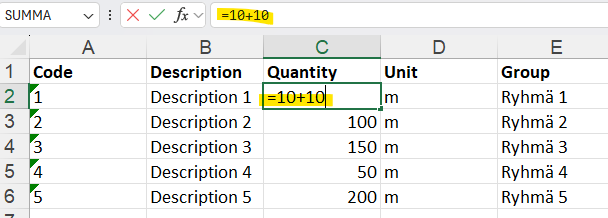
- Added the possibility to import excels with formulae or references to other sheets to Estima.
Fixes
- Fixed a bug where user could lose access to certain projects or project groups.
Software Update 2025.11.0 (27.10.2025)
Improvements and Fixes
- Quick-fix on 29.10.2025: C200 Cost Estimate report set to contain 1 decimal in Quantity column.
- Fix: The project list now refreshes correctly when switching from Estima to Insite, making it easier to view published projects.
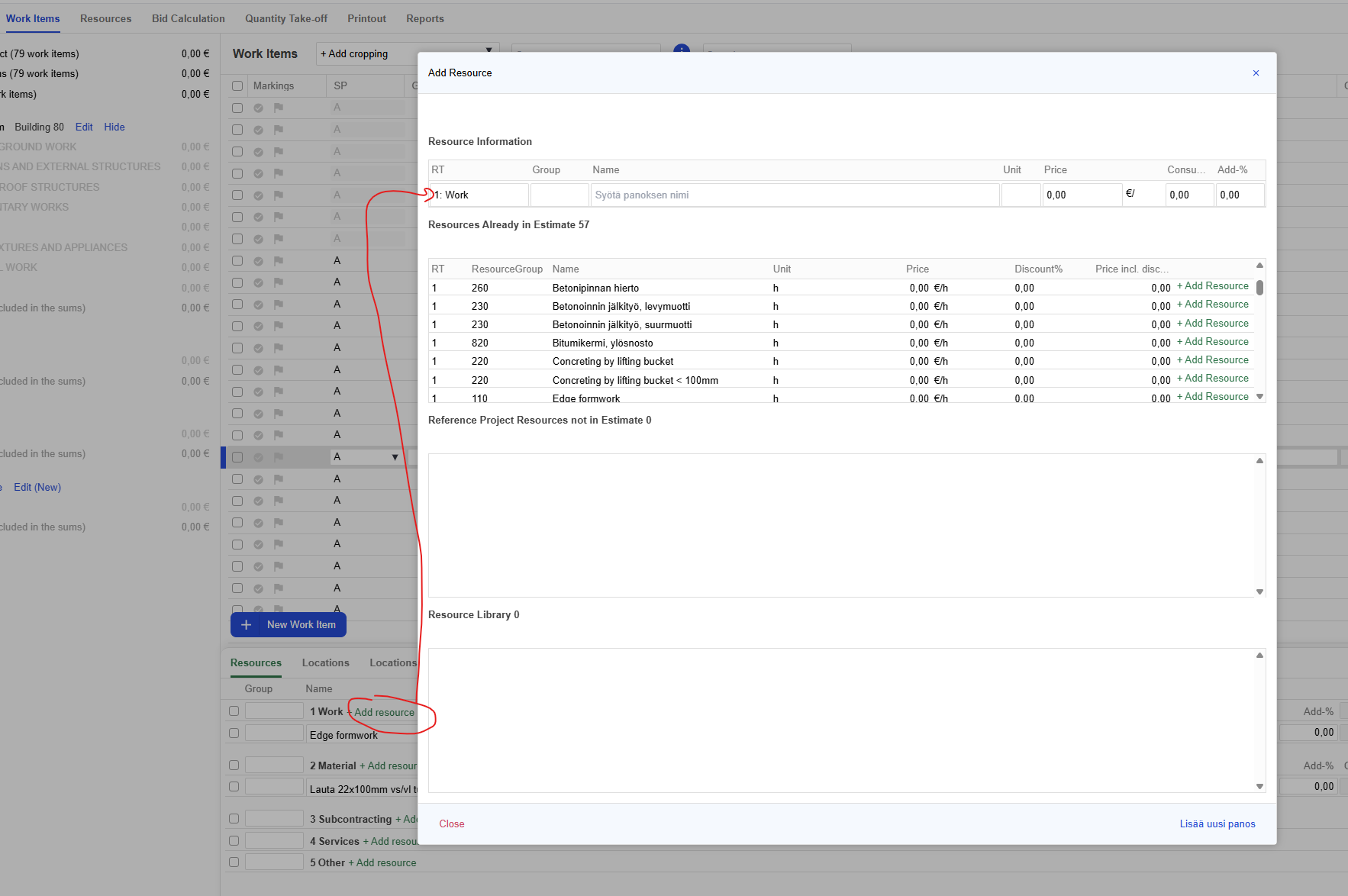
- Improvement/Fix: Enhanced the performance of the “Add resource” modal. Now, when you search for resources of a specific type (e.g., Resource type 1), only those resources are displayed. You can still search for other resources types within the same window by changing the resource type type filter in the upper-left corner of the modal. An unnecessary search field has also been removed for clarity.
- Fix: Resolved a calculation error in the Work Items window that affected exports such as Ultima XML.
Software update 2025.10.0 (14.10.2025)
Repaired/changed
- Fixed "included in the scope information"-checkbox of sub-projects of the summary tab to be taken into account in reports.
- Fixed a bug where project state could be left empty when creating a new project and thus lock the project from further modification.
Software update 2025.9.0 (3.9.2025)
A new feature
- New Notifications Feature
- New Help Site
- You can access the new help site by selecting the ? icon in the top bar.
- We will be moving and adding help material to the new pages during the fall
Software update 26.5.2025 (2025.7.0)
Repaired/changed
- Fixed the update of the resource change date in the resource window
Software update 15.5.2025 (2025.6.0)
Repaired/changed
- Fixed Estima-Tempo integration so that projects that were published for Reporting are displayed in Estima-Tempo integration
- Fixed Excel export currency symbols to be displayed wrong in the PrintOut view
- Fixed Summary output in the PrintOut view. The output did not work if the scope information had a value of 0
- Short by cost groups (functions menu) is now automatically on by default if the user has not turned them off separately
- The sums and units of Ultima XML cost groups have been corrected
- Fixed The scope information in the bid calculation so that the sub project scope information is now included in the total project amount
- Fixed the length of the resource type field so that entering a string that is too long is no longer possible
- Setting as project manager is now possible with administrator rights
- In addition, other program library updates
Software update 9.4.2025
Repair/ change
- Fixed resetting of work item selection when adding work items from the library to the building element
- Fixed the error related to the expiration of the login (token error), which caused red error messages for users
Software update 24.03.2025
Repair/ change
- Some of the checkboxes in the tables did not work after the previous update
- Now fixed checkbox selection (e.g. copying groups from another project and mass pricing windows)
Software update 18.03.2025
Repair/ change
- Some of the table components have been updated to the new version
- This fixes, among other things, the problem of duplicate buttons in some tables
- The user view has incorrectly displayed the user's write permission for the project
- Fixed so that, if there is write permission for at least one project or project group, the value write permission is displayed
Software update 18.02.2025
A new feature
- Resources by location by row -excel has been published for example for SAP-transfers. (Project->Resources->Functions->Resource locations by rows
Repair/ change
- PDF scale can be set in Quantity take-off via scale setting instead of just measuring a line. Take care to do a check measurement to ensure correct scale.
- Bug where location to a work item connected to a component only showed on work item level.
Software update 29.1.2025
A new feature
- The Work Item Group is now also included in function "Import of the bill of quantities"
- Work Items xls-file import "bill of quantities" warns now more clearly about duplicate codes
Repair/change
- Clarified in the "Export costs of work items by resource type" xls whether social costs are included in the sum or not
- In the Work items -view, the value of the "hour/unit" column is now with three decimal
- The project information window was frozen in a certain situationis now fixed
- Extra descriptions and buttons for switching to the old project list have been removed from the project listing
- Fixed the extra error messages that were displayed to the user in the resources view
- Corrected the column position saving in the project listing
Software update 18.12.2024
New feature
- Hourly pricing of work in the work-items row
- You can now add the hourly price of work and consumption rate directly in the work-item row. Check "Functions" to show the columns needed.
- New xlsx export functions in the resources window
- Now you can export resource costs and quantities by location to an Excel file.
- The Search function of work-items row has been modified
- Added function: Searches for the searched work-items row again when the user selects search function again.
Repair/ change
- When importing a projects transfer file, the project group is the project group of the projects transfer file by default
- Corrected so that the project group is empty in the future.
- The user does not see project groups when creating a project
- Changed so that the project group can be created for the desired project group regardless of rights
- The scaling factor of the images in the quantity take-off does not work correctly. We have hidden scale setting from proportion. Use "measure a line and type length" type of scale setting for now.
- Clarification of the organization settings in the administrator view
- Clarification of the Setting in the Organization and General main groups in the administrator view.
Software update 27.11.2024
Repair/ change
- A copied work Item seems to change the code of two activities.
- A copied work Item is now displayed as a separate line more clearly.
- When creating an work Item in the Building Components -window, the work Item unit is not saved.
- Creating an work Item now also saves the unit.
- The Search to work Item function (Search) does not find title rows.
- Corrected so that the Search to work Item function now also finds the title row.
- A project can only be placed in a project group to which the user has rights.
- Corrected so that the user can only select a project group for a project to which he has rights
Software update 31.10.2024
A new feature
- Search function
- In the execution window, you can use the new Find function to navigate directly to a line.
Repair/change
- Old "Search" -function changed to name "Crop"-function.
- Changed the name of the "Search" -function to "Cut" -function at the top of the Work Items window.
- English export Excel files column headers changed.
- The titles are now in English.
- Fixed the default order of titles in Classification grouping to ascending.
- When grouping according to Classification, order according to the code.
Software update 9/24/2024
A new feature
- Column width adjustment
- A feature has been added to the execution and contribution window where the width of the table columns can now be adjusted.
Repair/change
- Project import fixed
- An incorrect currency in project import caused an error.
- Project import fixed
- An error was caused by the too long text of the deliverable memo
- Edit multiple deliverables - Group function fixed
- A group action caused a white screen.